Chromatic API
Chromatic’s public API is built using GraphQL. If you are new to GraphQL, Apollo has resources for beginners. The official GraphQL documentation is another good starting point.
Prompt for AI-assisted set up
Follow this doc to authenticate with OAuth 2.0 in order to access the Chromatic API: https://www.chromatic.com/docs/llms/api.txt
If you have a client secret, authenticate with the client credentials grant. Otherwise, use the authorization code flow with PKCE.
The client ID is: <REPLACE_WITH_CLIENT_ID_FROM_YOUR_OAUTH_CLIENT> The client secret is: <REPLACE_WITH_CLIENT_SECRET_FROM_YOUR_OAUTH_CLIENT_OR_DELETE_THIS_LINE> The account ID is: <REPLACE_WITH_ACCOUNT_ID_OR_DELETE_THIS_LINE>
If you authenticated without a client secret, use the viewer query via accounts { projects }. If you have a client secret, use the account query with the account ID above.
Endpoint
Chromatic’s GraphQL endpoint is:
https://www.chromatic.com/apiIt supports introspection, so you can query the whole schema.
Introspection returns every field, but your token can only reach the fields its scopes allow. The scopes reference lists what each scope unlocks.
Getting started
To get a client ID, create an OAuth client: a user client for the authorization code flow with PKCE, or a service client for the client credentials (M2M) flow. With your client ID, go through the authorization flow (outlined below) to receive an access_token.
Once you have it, our GraphQL API is explorable and queryable via Apollo Studio: a GraphQL client where you can browse the schema and run queries.
Add the Authorization header with the value Bearer <access_token> to authenticate your requests.
Authentication
Chromatic supports two OAuth 2.0 flows to issue access tokens. All API requests must include a valid access token in the Authorization header.
| Flow | Use when | Credentials |
|---|---|---|
| Authorization code with PKCE | An agent or tool acts on behalf of a signed-in user, such as local development or an IDE agent | Client ID |
| Client credentials (M2M) | Headless automation runs with no user present, such as a CI pipeline, bot, or service | Client ID and client secret |
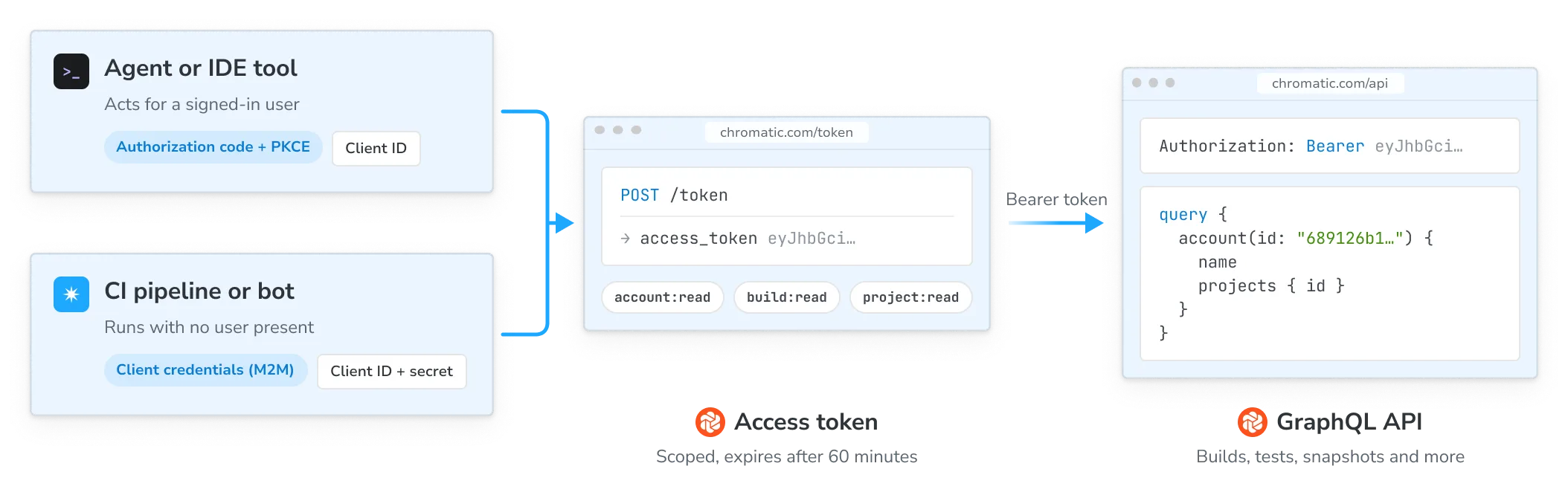
Authorization code with PKCE
Use your client ID with the Chromatic OAuth client to run the authorization code flow. This opens a browser window for you to approve access, then exchanges the resulting code for a token pair.
Authorization endpoint: https://www.chromatic.com/authorize
| Parameter | Value |
|---|---|
response_type | code |
client_id | <your_client_id> |
redirect_uri | Your local callback (e.g. http://localhost:8080/callback) |
scope | user:read account:read account:write project:read project:write build:read build:write storybook:read |
resource | https://www.chromatic.com/api (required) |
code_challenge_method | S256 |
Chromatic will redirect to your redirect_uri with ?code=<AUTH_CODE>&state=<STATE>.
Token endpoint: https://www.chromatic.com/token
| Parameter | Value |
|---|---|
grant_type | authorization_code |
client_id | <your_client_id> |
code | The authorization code from the redirect |
redirect_uri | Same value used in the authorization request |
code_verifier | Your PKCE verifier |
resource | https://www.chromatic.com/api (required) |
Include the access token in the Authorization header of every API request:
Authorization: Bearer <your_access_token>💡 Access tokens expire after 60 minutes. Use the refresh_token grant to get a new one without re-authorizing.
Refreshing your token
This applies only to the authorization code flow; the client credentials grant doesn’t issue refresh tokens. Access tokens are short-lived. Use your refresh_token to obtain a new token pair without re-authorizing. Refresh tokens rotate on every use. Always save the new refresh_token from the response.
curl -s -X POST https://www.chromatic.com/token \
  -H "Content-Type: application/x-www-form-urlencoded" \
  --data-urlencode "grant_type=refresh_token" \
  --data-urlencode "client_id=<your_client_id>" \
  --data-urlencode "refresh_token=<your_refresh_token>" \
  --data-urlencode "resource=https://www.chromatic.com/api"
Client credentials (M2M)
Service clients authenticate directly with a client ID and client secret. There’s no browser redirect and no user approval step, which makes this the right flow for CI pipelines, bots, and other headless automation. To create one, follow Create a service client.
Token endpoint: https://www.chromatic.com/token
| Parameter | Value |
|---|---|
grant_type | client_credentials (required) |
client_id | <your_client_id> (required) |
client_secret | <your_client_secret> (required) |
resource | https://www.chromatic.com/api (required) |
curl -s -X POST https://www.chromatic.com/token \
  -H "Content-Type: application/x-www-form-urlencoded" \
  --data-urlencode "grant_type=client_credentials" \
  --data-urlencode "client_id=<your_client_id>" \
  --data-urlencode "client_secret=<your_client_secret>" \
  --data-urlencode "resource=https://www.chromatic.com/api"
The response contains an access_token that you pass in the Authorization header, exactly as with the PKCE flow.
💡 Access tokens expire after 60 minutes. Service clients don’t receive a refresh token; they request a new access token with the same grant when the current one expires.
Treat the client secret like a password. Store it in your CI provider’s secret manager and never commit it. Chromatic shows it once, when you create the client, and can’t retrieve it afterward.
Service client tokens act on behalf of an account, not a user, so the viewer query and the user:read scope aren’t available. Use the account query as your entry point instead.
Making requests
All requests are POST to https://www.chromatic.com/api with a JSON body containing your query and optionally variables.
This example queries viewer, which requires the user:read scope and is available only via the authorization code with PKCE flow. With a service client token, query account instead.
curl -s -X POST https://www.chromatic.com/api \
  -H "Content-Type: application/json" \
  -H "Authorization: Bearer <your_access_token>" \
  -d '{
    "query": "{ viewer { id name username } }"
  }'
A successful response looks like this:
{
  "data": {
    "viewer": {
      "id": "User:5f3e7b2a1c9d4e0001a2b3c4",
      "name": "Jane Smith",
      "username": "janesmith"
    }
  }
}
Errors
A request that fails parsing or validation returns HTTP 400 with a GRAPHQL_VALIDATION_FAILED error. An error during execution returns HTTP 200. Check the errors array in every response, whatever the status code:
{
  "errors": [
    {
      "message": "Not authorized",
      "locations": [{ "line": 1, "column": 3 }],
      "path": ["viewer"]
    }
  ],
  "data": null
}
Common error causes:
- Expired token: access tokens last 60 minutes; refresh and retry
- Insufficient scope: the token doesn’t include the scope required for that field
- Not found: the requested ID doesn’t exist or isn’t accessible to the authenticated user
- Rate limited: HTTP
429with codeRATE_LIMITED; wait for the time inRetry-After, then retry (see Rate limits)
Queries
viewer
Returns the authenticated user’s profile. Requires the user:read scope, which is available via the authorization code with PKCE flow only.
curl -s -X POST https://www.chromatic.com/api \
  -H "Content-Type: application/json" \
  -H "Authorization: Bearer <your_access_token>" \
  -d '{
    "query": "{ viewer { id name projectCount accounts { id name } } }"
  }'
{
"data": {
"viewer": {
"id": "User:5f3e7b2a1c9d4e0001a2b3c4",
"name": "Jane Smith",
"projectCount": 8,
"accounts": [
{
"id": "Account:689126b1bf7b127209b4c5b1",
"name": "Acme Org"
}
]
}
}
}account
Returns an account by ID, either a personal account or an organization account. Requires the account:read scope.
Arguments:
| Argument | Type | Description |
|---|---|---|
id | ID! | Account identifier |
Both the bare ID and the prefixed Account: form (as returned in API responses) are accepted.
curl -s -X POST https://www.chromatic.com/api \
  -H "Content-Type: application/json" \
  -H "Authorization: Bearer <your_access_token>" \
  -d '{
    "query": "query($id: ID!) { account(id: $id) { id name webUrl projects { id }} }",
    "variables": { "id": "<account_id>" }
  }'
{
"data": {
"account": {
"id": "689126b1bf7b127209b4c5b1",
"name": "Acme Org",
"webUrl": "https://www.chromatic.com/apps?accountId=689126b1bf7b127209b4c5b1",
"projects": [
{
"id": "Project:689126d2bf7b127209b4c5b2"
}
]
}
}
}project
Returns a project by ID. Requires the project:read scope.
Arguments:
| Argument | Type | Description |
|---|---|---|
id | ID! | Project identifier |
curl -s -X POST https://www.chromatic.com/api \
  -H "Content-Type: application/json" \
  -H "Authorization: Bearer <your_access_token>" \
  -d '{
    "query": "query($id: ID!) { project(id: $id) { id name webUrl branchNames lastBuild { id number status branch } } }",
    "variables": { "id": "<project_id>" }
  }'
{
"data": {
"project": {
"id": "Project:689126d2bf7b127209b4c5b2",
"name": "Marketing Site",
"webUrl": "https://www.chromatic.com/builds?appId=689126d2bf7b127209b4c5b2",
"branchNames": ["main", "feat/new-button"],
"lastBuild": {
"id": "Build:6891293bbf7b127209b4c6e8",
"number": 42,
"status": "PASSED",
"branch": "main"
}
}
}
}build
Returns a build by ID. Requires the build:read scope.
Arguments:
| Argument | Type | Description |
|---|---|---|
id | ID! | Build identifier |
Builds progress through several stages (AnnouncedBuild, PublishedBuild, PreparedBuild, StartedBuild, and CompletedBuild) and expose different fields at each stage. Use inline fragments to handle this:
curl -s -X POST https://www.chromatic.com/api \
  -H "Content-Type: application/json" \
  -H "Authorization: Bearer <your_access_token>" \
  -d '{
    "query": "query($id: ID!) { build(id: $id) { id number status branch commit ... on CompletedBuild { result testCount componentCount storybookUrl tests { nodes { id } } } } }",
    "variables": { "id": "<build_id>" }
  }'
{
"data": {
"build": {
"id": "Build:6891293bbf7b127209b4c6e8",
"number": 42,
"status": "PASSED",
"branch": "main",
"commit": "a1b2c3d4e5f6",
"result": "SUCCESS",
"testCount": 128,
"componentCount": 24,
"storybookUrl": "https://689126d2bf7b127209b4c5b2-afxirxnxyz.chromatic.com/",
"tests": {
"nodes": [
{
"id": "Test:6891294cbf7b127209b4c6f6"
},
{
"id": "Test:6891294cbf7b127209b4c6fe"
}
]
}
}
}
}Test-level data
Each test in a build has one visual comparison per tested browser and one accessibility comparison, because accessibility tests run only in Chrome. A test captured in Chrome and Firefox has two visualComparisons entries and one accessibilityComparisons entry. Select visualComparisons for the visual result and diff image, and accessibilityComparisons for the accessibility rules whose violations changed. tests is a paginated connection, so pass first and read pageInfo to fetch the next page (see Aliases and pagination).
query ($id: ID!) {
  build(id: $id) {
    ... on CompletedBuild {
      tests(first: 50) {
        pageInfo {
          hasNextPage
          endCursor
        }
        nodes {
          id
          status
          result
          isUnstable
          ignoreReason
          visualComparisons {
            result
            platform {
              name
            }
            viewport {
              width
            }
            diff {
              result
              diffImage {
                imageUrl
              }
            }
          }
          accessibilityComparisons {
            result
            diff {
              result
              rules {
                rule
                title
                helpUrl
                change
              }
            }
          }
        }
      }
    }
  }
}
change is the net change in the number of elements that violate the rule. Positive numbers mean new violations.
To find out why a story failed to capture, select headCapture on a visual comparison. captureError.kind names the cause (for example FAILED_JS, RENDER_TIMEOUT, or STORY_MISSING), and some kinds carry more detail, such as the original JavaScript error. links points to the files Chromatic recorded during the capture.
query ($id: ID!) {
  build(id: $id) {
    ... on CompletedBuild {
      tests(statuses: [BROKEN], first: 20) {
        nodes {
          id
          visualComparisons {
            headCapture {
              result
              captureError {
                kind
                ... on CaptureErrorFailedJS {
                  error
                }
              }
              links {
                errorsJson
                domSnapshot
                trace
              }
            }
          }
        }
      }
    }
  }
}
errorsJson links to the full error with its stack trace, domSnapshot to the captured DOM as HTML, and trace to a Playwright trace. Each is null when the capture didn’t produce that file.
Test.comparisons is deprecated. Use visualComparisons and accessibilityComparisons instead. See the deprecation policy.
storybook
Returns a published Storybook by URL. Supports Chromatic-hosted URLs and custom domains. Requires the storybook:read scope.
Arguments:
| Argument | Type | Description |
|---|---|---|
url | URL! | URL of the published Storybook |
curl -s -X POST https://www.chromatic.com/api \
  -H "Content-Type: application/json" \
  -H "Authorization: Bearer <your_access_token>" \
  -d '{
    "query": "query($url: URL!) { storybook(url: $url) { buildUrl storybookUrl } }",
    "variables": { "url": "<storybook_url>" }
  }'
{
"data": {
"storybook": {
"buildUrl": "https://www.chromatic.com/builds?appId=689126d2bf7b127209b4c5b2&number=42",
"storybookUrl": "https://689126d2bf7b127209b4c5b2-afxirxnxyz.chromatic.com/"
}
}
}Mutations
reviewTest
Accepts or denies a test snapshot, optionally applying the decision to all tests in the same story, component, or build. Requires the build:write scope.
Input fields:
| Field | Type | Description |
|---|---|---|
testId | ID! | The test to review |
status | ReviewTestInputStatus! | ACCEPTED, DENIED, IGNORED, or PENDING (resets to unreviewed) |
batch | ReviewTestBatch | Optionally apply to SPEC (story), COMPONENT, or BUILD |
curl -s -X POST https://www.chromatic.com/api \
  -H "Content-Type: application/json" \
  -H "Authorization: Bearer <your_access_token>" \
  -d '{
    "query": "mutation($input: ReviewTestInput!) { reviewTest(input: $input) { updatedTests { id status result } userErrors { ... on BuildSupersededError { message } ... on TestNotFoundError { message } ... on TestUnreviewableError { message } } } }",
    "variables": {
      "input": {
        "testId": "<test_id>",
        "status": "ACCEPTED"
      }
    }
  }'
{
"data": {
"reviewTest": {
"updatedTests": [
{
"id": "Test:6891294cbf7b127209b4c6fe",
"status": "ACCEPTED",
"result": "ADDED"
}
],
"userErrors": []
}
}
}If the review fails, errors come back in userErrors rather than the top-level errors array. Always check this field:
{
  "data": {
    "reviewTest": {
      "updatedTests": null,
      "userErrors": [{ "message": "Build is superseded by a newer build on this branch" }]
    }
  }
}
testQuarantine
Quarantines the story and mode of a test. Quarantining also ignores the test, so it no longer blocks the build. The story stays quarantined, and its tests stay ignored in later builds, until you remove it with testUnquarantine. Requires the build:write scope, and quarantine must be enabled for the account. Learn more about quarantining tests.
Input fields:
| Field | Type | Description |
|---|---|---|
testId | ID! | The test whose story and mode should be quarantined |
The response is a union: TestQuarantineSuccess or TestQuarantineFailure. Select both with inline fragments.
curl -s -X POST https://www.chromatic.com/api \
  -H "Content-Type: application/json" \
  -H "Authorization: Bearer <your_access_token>" \
  -d '{
    "query": "mutation($input: TestQuarantineInput!) { testQuarantine(input: $input) { ... on TestQuarantineSuccess { test { id status } quarantinedStory { id modeName } } ... on TestQuarantineFailure { errors { ... on TestNotFoundError { message } ... on TestUnsupportedStatusError { message } ... on QuarantineFeatureUnavailableError { message } ... on UnknownMutationError { message } } } } }",
    "variables": {
      "input": {
        "testId": "<test_id>"
      }
    }
  }'
{
"data": {
"testQuarantine": {
"test": {
"id": "Test:6891294cbf7b127209b4c6fe",
"status": "IGNORED"
},
"quarantinedStory": {
"id": "QuarantinedStory:6891295dbf7b127209b4c712",
"modeName": "Dark Mobile"
}
}
}
}If quarantining fails, the response is a TestQuarantineFailure with a non-empty errors list:
TestNotFoundError: the test doesn’t exist or isn’t accessible to the token.TestUnsupportedStatusError: the test’s status can’t be quarantined, such asBROKENorFAILED.QuarantineFeatureUnavailableError: quarantine isn’t enabled for the account.UnknownMutationError: any other error. Readmessagefor details.
testUnquarantine
Removes the story and mode of a test from quarantine. If the test was ignored because of the quarantine, its status resets to PENDING. A test that was also ignored for another reason, such as being flagged as unstable, stays IGNORED. Requires the build:write scope.
Input fields:
| Field | Type | Description |
|---|---|---|
testId | ID! | The test whose story and mode should be removed from quarantine |
curl -s -X POST https://www.chromatic.com/api \
  -H "Content-Type: application/json" \
  -H "Authorization: Bearer <your_access_token>" \
  -d '{
    "query": "mutation($input: TestUnquarantineInput!) { testUnquarantine(input: $input) { ... on TestUnquarantineSuccess { test { id status } } ... on TestUnquarantineFailure { errors { ... on TestNotFoundError { message } ... on QuarantineFeatureUnavailableError { message } ... on UnknownMutationError { message } } } } }",
    "variables": {
      "input": {
        "testId": "<test_id>"
      }
    }
  }'
{
"data": {
"testUnquarantine": {
"test": {
"id": "Test:6891294cbf7b127209b4c6fe",
"status": "PENDING"
}
}
}
}A TestUnquarantineFailure returns the same errors as testQuarantine, except TestUnsupportedStatusError.
Limits and rate limits
Chromatic may change these limits as it monitors usage, so read the rate limit headers on each response instead of hard-coding the numbers below.
Aliases and pagination
A query can use at most one field alias.
Every query counts against your rate limits, so keep queries cheap:
- Page through lists with
firstandafter. ReadpageInfo.hasNextPageand passpageInfo.endCursorasafterto get the next page. - Select only the fields you need. Image URLs are long, so ask for them on a few tests at a time.
- Filter on the server where you can, for example
tests(statuses: [PENDING]).
query ($id: ID!, $after: ID) {
  build(id: $id) {
    ... on CompletedBuild {
      tests(first: 50, after: $after) {
        totalCount
        pageInfo {
          hasNextPage
          endCursor
        }
        nodes {
          id
          status
        }
      }
    }
  }
}
Primary and secondary limits
Every request to /api is checked against a primary limit on query complexity and one or more secondary limits that guard against other kinds of heavy use. Each limit is tracked per authenticated user. If a request exceeds any of them, Chromatic rejects it.
| Limit | Kind | Resource name | Allowance | Window | What counts |
|---|---|---|---|---|---|
| Query complexity | Primary | graphql | 5,000 points | 60 s | The complexity score of each query, computed before it runs |
| Request count | Secondary | graphql-request-count | 120 requests | 60 s | 1 per request, regardless of the query |
Chromatic may change or add secondary limits over time. Each one has its own resource name, so if your client reads x-ratelimit-resource, it handles new limits without changes.
Pure introspection queries (only __schema, __type, and __typename) cost 0 complexity points and are never blocked by the primary limit. They still count as a request toward the request count limit.
Rate limit headers
Every response from /api includes x-ratelimit-* headers that describe one limit. Normally that’s the primary limit. If you exceed a secondary limit, the headers describe that limit instead. Use x-ratelimit-resource to tell which one you’re looking at.
| Header | Meaning |
|---|---|
x-ratelimit-resource | Which limit the other headers describe: graphql for the primary limit, or a secondary limit’s name such as graphql-request-count |
x-ratelimit-limit | Your allowance for that limit in the current window |
x-ratelimit-remaining | How much of that allowance is left |
x-ratelimit-used | How much of that allowance you’ve used, including this request |
x-ratelimit-reset | When the window resets, as Unix epoch seconds (UTC) |
Query complexity
Complexity is an estimate of how many entities a query will fetch. Chromatic computes it from the shape of the query and its arguments before the query runs. Every query that isn’t pure introspection costs at least 1 point.
| Query element | Cost |
|---|---|
A field that returns an entity (any type that implements Node, such as Project, Build, or Test) | 1, plus the cost of its selections |
| A scalar, enum, or embedded value object | 0 |
A paginated field (with a first, last, or limit argument) | 2, plus the cost of each item multiplied by the page size |
| A mutation field | 10, plus the cost of the returned selections |
Introspection fields (__schema, __type, __typename) | 0 |
Costs multiply down the tree. If you leave out the page argument on a paginated field, Chromatic charges it as if it returned 100 items, the default page size. Asking for a smaller page is a simple way to lower the cost of a query.
For example, this query fetches up to 50 tests from a project’s last build, with the baseline of each test:
query ($id: ID!) {
  project(id: $id) {
    lastBuild {
      ... on CompletedBuild {
        tests(first: 50) {
          nodes {
            id
            baseline {
              id
            }
          }
        }
      }
    }
  }
}
It costs 1 for the project, 1 for the build, and 2 for the tests connection. Then each of the 50 tests costs 1, plus 1 for its baseline. That’s 1 + 1 + 2 + 50 × (1 + 1) = 104 points. Without first, the same query is charged for 100 tests: 1 + 1 + 2 + 100 × (1 + 1) = 204 points.
A few fields do more work and declare a higher fixed cost. The x-ratelimit-used header is the authoritative cost of any query.
Exceeding a limit
When a request exceeds any limit, Chromatic rejects it with HTTP 429 Too Many Requests before any resolver runs, so a rejected request has no side effects. The response includes:
- A
Retry-Afterheader with the whole number of seconds until the window resets. It’s never0. - The
x-ratelimit-*headers for the limit that rejected the request, withx-ratelimit-remaining: 0. - A GraphQL error with code
RATE_LIMITEDand arateLimitextension that carries the same values as the headers.
Here’s a request rejected by the request count limit:
HTTP/1.1 429 Too Many Requests
Retry-After: 23
x-ratelimit-resource: graphql-request-count
x-ratelimit-limit: 120
x-ratelimit-remaining: 0
x-ratelimit-used: 120
x-ratelimit-reset: 1761562823

{
  "errors": [
    {
      "message": "Rate limit exceeded, try again in 22418ms",
      "extensions": {
        "code": "RATE_LIMITED",
        "rateLimit": {
          "resource": "graphql-request-count",
          "limit": 120,
          "remaining": 0,
          "used": 120,
          "resetAt": 1761562823,
          "retryAfterSeconds": 23
        }
      }
    }
  ]
}
A rejected request still uses up your other limits. In the example above, the query’s complexity points count against the primary limit even though the request count limit rejected it.
Best practices
- Read the headers on every response instead of hard-coding the limits. Your allowance can differ from the defaults, and the resource the headers describe can change between responses.
- On a
429, wait the number of seconds inRetry-Afterbefore you retry. If you retry sooner, the request is rejected again and still counts toward the request count limit. - Watch
x-ratelimit-remainingand slow down before it reaches 0. If you stay under every limit, you never get a429. - Pass explicit page sizes. A paginated field without a page argument such as
firstis charged for 100 items, whether or not that many exist. - Fetch what you need in fewer, well-shaped queries. The request count limit charges per HTTP request, so one query that combines related reads is cheaper than many small ones, as long as its complexity stays within budget.
Scopes reference
Scopes follow a subject:action pattern. Requesting a scope grants access to the endpoints listed below, nothing more.
| Scope | What it unlocks |
|---|---|
user:read | viewer query: name, username, avatar, project count |
account:read | account query: account name, avatar, projects list |
account:write | account.subscription field: billing and plan details |
project:read | project query: project metadata, branch names, last build |
project:write | Write operations on projects, currently creating a project (projectCreate) |
build:read | build query and anything associated with a build, including test results and accessibility results |
build:write | Write operations on builds, currently reviewing tests (reviewTest) and quarantining or unquarantining them |
storybook:read | storybook query: published Storybook URL and build link |
Deprecation & Breaking Changes Policy
We’ll announce upcoming breaking changes at least 3 months in advance of any changes to the GraphQL schema, to give integrators time to make the necessary adjustments. Changes take effect on the first day of each quarter (January 1st, April 1st, July 1st, or October 1st). For example, if we announce a change on January 15th, it will be made on July 1st.
A complete history of API changes is available in the Public API changelog.
Changes for January 1, 2027
Test.comparisonswill be removed. Please useTest.visualComparisonsandTest.accessibilityComparisonsinstead.